Practical HeuDiConv Example
In the following example, we will use the recommended directory structure. The dataset will be named D01, and it’s parent
directory will be /data/project/genlab/datasets to mimic a generic project
directory found on Cheaha. When running this tool, be sure to change any paths
and folder or subject names to match your dataset.
The example session has the following scan types: - 1 T1w and 1 T2w - 2 multiband resting state BOLDS - 1 multiband emotion recognition BOLD named Emotion - 2 two multiband diffusion scans - A pair of spin-echo fieldmaps
A folder with those scans could look like the following:
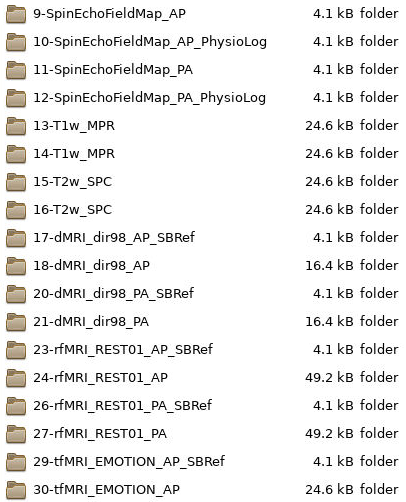
Every multiband scan will have a corresponding SBRef scan that will also need to be accounted for in the key.
Step 1: Generate Scan Info
Note
Remember, Step 1 only needs to be done once to generate the base heuristic and the scan parameters for key matching. The same heuristic can be used for every participant as long as the scan parameters are not changed.
The first step is to generate the scan info to match to. We can assign our
dataset directory path to BASE_DIR for to make the command easier to type
and more succinct.
# set the base dataset directory
BASE_DIR=/data/project/genlab/datasets/D01

heudiconv -s S101 -ss 01 -d $BASE_DIR/dicom/{subject}/ses-{session}/*/*.dcm
-o $BASE_DIR/nifti -f convertall -c none --overwrite
Step 2: Example Heuristic
Anatomicals
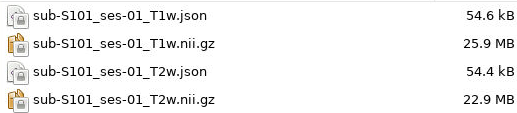
We have one T1w and one T2w scan, both of which have raw and normalized versions. In our case, we only want to convert the normalized versions. Our key for the anatomicals will be basic, only including the subject and session as variable. The keys will look like:
t1 = create_key('sub-{subject}/{session}/anat/sub-{subject}_{session}_T1w')
t2 = create_key('sub-{subject}/{session}/anat/sub-{subject}_{session}_T2w')
Next, we can determine the if statements for associating the keys with the
info dictionary. Since we only want to use one T1w and one T2w, we can just
assign the series ID directly to the info dictionary. We will match on the
number of acquired slices, the T?w portion of the protocol name to
differentiate between T1w and T2w, and ‘NORM’ in the image_type so that we
choose the normalized scans. These if statements that go in the association
loop will look like:
if (s.dim3 == 208) and ('T1w' in s.protocol_name) and ('NORM' in s.image_type):
    info[t1] = [s.series_id]
if (s.dim3 == 208) and ('T2w' in s.protocol_name) and ('NORM' in s.image_type):
    info[t2] = [s.series_id]
It is possible to use multiple T1w and T2w scans, although the keys and association statements would need to be amended to include run information. Examples of this can be seen in the Functionals, Field Maps, and Diffusion sections.
Field Maps
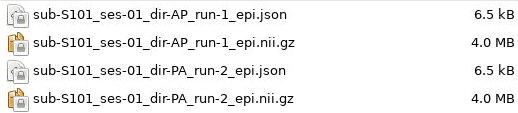
We have two field maps taken in the AP and PA directions. In order to create a sufficient key, we will need to add the direction information to the key and association sections. Additionally, we can add run information in case some subjects have multiple fieldmaps. Our key for Spin Echo field maps will be:
fmap = create_key('sub-{subject}/{session}/fmap/sub-{subject}_{session}_dir-{dir}_run-{item:01d}_epi')
Since we are accounting for the possiblity of multiple field maps in the same
direction, we will use the append method instead of direct assignment to the
info dictionary. The field map association statement will look like:
if (s.dim4 == 3) and ('SpinEchoFieldMap_AP' in s.protocol_name):
    info[fmap].append({'item': s.series_id, 'dir':'AP'})
if (s.dim4 == 3) and ('SpinEchoFieldMap_PA' in s.protocol_name):
    info[fmap].append({'item': s.series_id, 'dir':'PA'})
We chose to match on the fact each field map has 3 volumes and contains
SpinEchoFieldMap in the protocol_name. There is a split based on which direction
the field map was acquired in which changes the dir field.
Functionals
We have multiple resting state scans as well as an emotion recognition task
scan. We will create separate keys and association statements for both of these
types of scans. Because there are multiple resting state scans acquired in
multiple directions, we will include direction and run information in the
rest key.
Additionally, because these are multiband scans, there are SBRef volumes associated with both scan types. An SBRef key should be made alongside each BOLD scan type.
rest = create_key('sub-{subject}/{session}/func/sub-{subject}_{session}_task-rest_dir-{dir}_run-{item:01d}_bold')
rest_sbref = create_key('sub-{subject}/{session}/func/sub-{subject}_{session}_task-rest_dir-{dir}_run-{item:01d}_sbref')

emotion = create_key('sub-{subject}/{session}/func/sub-{subject}_{session}_task-Emotion_run-{item:01d}_bold')
emotion_sbref = create_key('sub-{subject}/{session}/func/sub-{subject}_{session}_task-Emotion_run-{item:01d}_sbref')
You can see that the only difference between the BOLD scans and their SBRef keys
is that the bold tag at the end of the scan has been changed to sbref.
The rest of the name should be exactly the same.
In the same way as the field maps, we will include run number for both rest and Emotion keys and direction information for the rest key and association statements.
# match REST scans and their SBRefs
if (s.dim4 == 420) and ('REST' in s.dcm_dir_name) and ('AP' in s.dcm_dir_name):
    info[rest].append({'item': s.series_id, 'dir': 'AP'})
if (s.dim4 == 420) and ('REST' in s.dcm_dir_name) and ('PA' in s.dcm_dir_name):
    info[rest].append({'item': s.series_id, 'dir': 'PA'})
if (s.dim4 == 1) and ('REST' in s.dcm_dir_name) and ('AP' in s.dcm_dir_name):
    info[rest_sbref].append({'item': s.series_id, 'dir':'AP'})
if (s.dim4 == 1) and ('REST' in s.dcm_dir_name) and ('PA' in s.dcm_dir_name):
    info[rest_sbref].append({'item': s.series_id, 'dir':'PA'})


# match Emotion scans and their SBRefs
if (s.dim4 == 176) and ('EMOTION' in s.dcm_dir_name):
    info[emotion].append({'item': s.series_id})
if (s.dim4 == 1) and ('Emotion' in s.dcm_dir_name) and ('SBRef' in s.dcm_dir_name):
    info[emotion_sbref].append({'item': s.series_id})
For resting state scans, we matched on having ‘REST’ in the name and the direction the scan was acquired in. We also matched based on the number of volumes to differentiate between the BOLD scans and their SBRefs. The same thing was done for the Emotion scan and its SBRef minus the direction information.
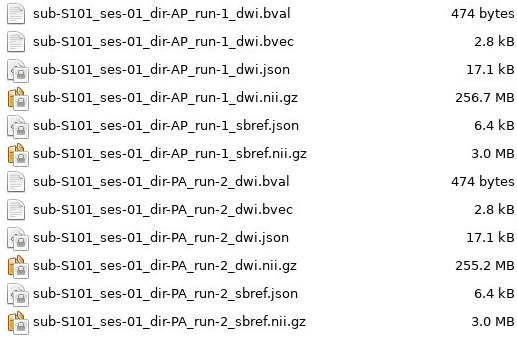
Diffusion
The diffusion block looks very similar to the functional block since we are
adding both direction and run number to the key. Again, since the diffusion
scans are also multiband, there will be SBRef volumes to convert as well. These
SBrefs will have the same sbref tag at the end that the functional SBRefs
had, but are differentiated by being stored in the dwi output directory with
the diffusion scans.
dwi = create_key('sub-{subject}/{session}/dwi/sub-{subject}_{session}_dir-{dir}_run-{item:01d}_dwi')
dwi_sbref = create_key('sub-{subject}/{session}/dwi/sub-{subject}_{session}_dir-{dir}_run-{item:01d}_sbref')
The key association portion will also look similar to the functional section, substituting in diffusion scan information where necessary. Since we only have one overall type of diffusion scan (as opposed to task and rest being different for functionals), we will match on the ‘dMRI’ in the name as well as the direction.
# match full diffusion scans including direction
if (s.dim4 == 99) and ('dMRI' in s.dcm_dir_name) and ('AP' in s.dcm_dir_name):
            info[dwi].append({'item': s.series_id, 'dir':'AP'})
if (s.dim4 == 99) and ('dMRI' in s.dcm_dir_name) and ('PA' in s.dcm_dir_name):
            info[dwi].append({'item': s.series_id, 'dir':'PA'})

    # match diffusion SBRef including direction to match the full dwi
    # scan names
if (s.dim4 == 1) and ('dMRI' in s.dcm_dir_name) and ('AP' in s.dcm_dir_name):
            info[dwi_sbref].append({'item': s.series_id, 'dir':'AP'})
if (s.dim4 == 1) and ('dMRI' in s.dcm_dir_name) and ('PA' in s.dcm_dir_name):
            info[dwi_sbref].append({'item': s.series_id, 'dir':'PA'})
These block together form the full heuristic file we will use for sorting these data into BIDS format.The full heuristic file for this example, including the matching criteria, can be seen below:
import os

def create_key(template, outtype=('nii.gz',), annotation_classes=None):
    if template is None or not template:
            raise ValueError('Template must be a valid format string')
    return template, outtype, annotation_classes


def infotodict(seqinfo):
    """Heuristic evaluator for determining which runs belong where

    allowed template fields - follow python string module:

    item: index within category
    subject: participant id
    seqitem: run number during scanning
    subindex: sub index within group
    """

    ########################## Scan Keys ##############################
    t1 = create_key('sub-{subject}/{session}/anat/sub-{subject}_{session}_T1w')
    t2 = create_key('sub-{subject}/{session}/anat/sub-{subject}_{session}_T2w')

    fmap = create_key('sub-{subject}/{session}/fmap/sub-{subject}_{session}_dir-{dir}_run-{item:01d}_epi')

    rest = create_key('sub-{subject}/{session}/func/sub-{subject}_{session}_task-rest_dir-{dir}_run-{item:01d}_bold')
    rest_sbref = create_key('sub-{subject}/{session}/func/sub-{subject}_{session}_task-rest_dir-{dir}_run-{item:01d}_sbref')

    emotion = create_key('sub-{subject}/{session}/func/sub-{subject}_{session}_task-Emotion_run-{item:01d}_bold')
    emotion_sbref = create_key('sub-{subject}/{session}/func/sub-{subject}_{session}_task-Emotion_run-{item:01d}_sbref')

    dwi = create_key('sub-{subject}/{session}/dwi/sub-{subject}_{session}_dir-{dir}_run-{item:01d}_dwi')
    dwi_sbref = create_key('sub-{subject}/{session}/dwi/sub-{subject}_{session}_dir-{dir}_run-{item:01d}_sbref')

    info = {t1:[], t2:[], fmap:[], rest:[], emotion:[], rest_sbref:[], emotion_sbref:[], dwi:[], dwi_sbref:[]}

    ################# Associate Keys with Scans #######################
    for idx, s in enumerate(seqinfo):
            # match T1 and T2 scans. No appending due to only wanting a single
            # of each type
            if (s.dim3 == 208) and ('T1w' in s.protocol_name) and ('NORM' in s.image_type):
                    info[t1] = [s.series_id]
            if (s.dim3 == 208) and ('T2w' in s.protocol_name) and ('NORM' in s.image_type):
                    info[t2] = [s.series_id]

            # match phase-encoded fieldmaps including direction
            if (s.dim4 == 3) and ('SpinEchoFieldMap_AP' in s.protocol_name):
                    info[fmap].append({'item': s.series_id, 'dir':'AP'})
            if (s.dim4 == 3) and ('SpinEchoFieldMap_PA' in s.protocol_name):
                    info[fmap].append({'item': s.series_id, 'dir':'PA'})

            # match full functional scans including direction for the REST scans
            if (s.dim4 == 420) and ('REST' in s.dcm_dir_name) and ('AP' in s.dcm_dir_name):
                    info[rest].append({'item': s.series_id, 'dir':'AP'})
            if (s.dim4 == 420) and ('REST' in s.dcm_dir_name) and ('PA' in s.dcm_dir_name):
                    info[rest].append({'item': s.series_id, 'dir':'PA'})
            if (s.dim4 == 1) and ('REST' in s.dcm_dir_name) and ('AP' in s.dcm_dir_name):
                    info[rest_sbref].append({'item': s.series_id, 'dir':'AP'})
            if (s.dim4 == 1) and ('REST' in s.dcm_dir_name) and ('PA' in s.dcm_dir_name):
                    info[rest_sbref].append({'item': s.series_id, 'dir':'PA'})

            # match functional SBRef including direction to match the full functional scan names
            if (s.dim4 == 176) and ('EMOTION' in s.dcm_dir_name):
                    info[emotion].append({'item': s.series_id})
            if (s.dim4 == 1) and ('EMOTION' in s.dcm_dir_name):
                    info[emotion_sbref].append({'item': s.series_id})

            # match full diffusion scans including direction
            if (s.dim4 == 99) and ('dMRI' in s.dcm_dir_name) and ('AP' in s.dcm_dir_name):
                    info[dwi].append({'item': s.series_id, 'dir':'AP'})
            if (s.dim4 == 99) and ('dMRI' in s.dcm_dir_name) and ('PA' in s.dcm_dir_name):
                    info[dwi].append({'item': s.series_id, 'dir':'PA'})

            # match diffusion SBRef including direction to match the full dwi
            # scan names
            if (s.dim4 == 1) and ('dMRI' in s.dcm_dir_name) and ('AP' in s.dcm_dir_name):
                    info[dwi_sbref].append({'item': s.series_id, 'dir':'AP'})
            if (s.dim4 == 1) and ('dMRI' in s.dcm_dir_name) and ('PA' in s.dcm_dir_name):
                    info[dwi_sbref].append({'item': s.series_id, 'dir':'PA'})


    return info
Step 3: BIDS Conversion
At this point, the heuristic is set up, and the last step is performing the sort. The command looks very similar to that in Step 1, with a couple of changes. The command we use here is:
# Give a path to the dataset directory that we can use
BASE_DIR=/data/project/genlab/datasets/D01

heudiconv -s S101 -ss 01 -d $BASE_DIR/dicom/{subject}/ses-{session}/*/*.dcm -o $BASE_DIR/nifti -f $BASE_DIR/heuristic.py -c dcm2niix -b --overwrite
The only options that have changed are:
-f: changed from convertall to the path to the heuristic-c: changed from none to dcm2niix-b: added
BIDS Outputs
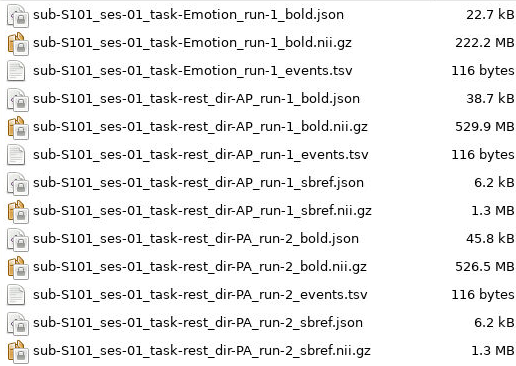
Once the function finishes, there will a subject and session path in the
$BASE_DIR/nifti directory that leads to the BIDS converted files. For this
example, there will be anat, fmap, func, and dwi folders. The
output file structure for these folders can be seen below.
D01/nifti/sub-S101/ses-01/anat:
D01/nifti/sub-S101/ses-01/fmap:
D01/nifti/sub-S101/ses-01/func:
D01/nifti/sub-S101/ses-01/dwi: